Tools
Every module in this course comes back to one decision: which rung of the tool ladder a task actually needs. Module 1 introduces that ladder with one comparison. A plain chat window fails to open a Compustat extract, and the same request succeeds once an agent can read, script, and run. This page is the reference version of that lecture. It covers four tools, what each one is good for, what each costs, and a table for matching a research task to the right one. The page is updated on its own schedule, because tool capabilities and pricing change faster than a syllabus does.
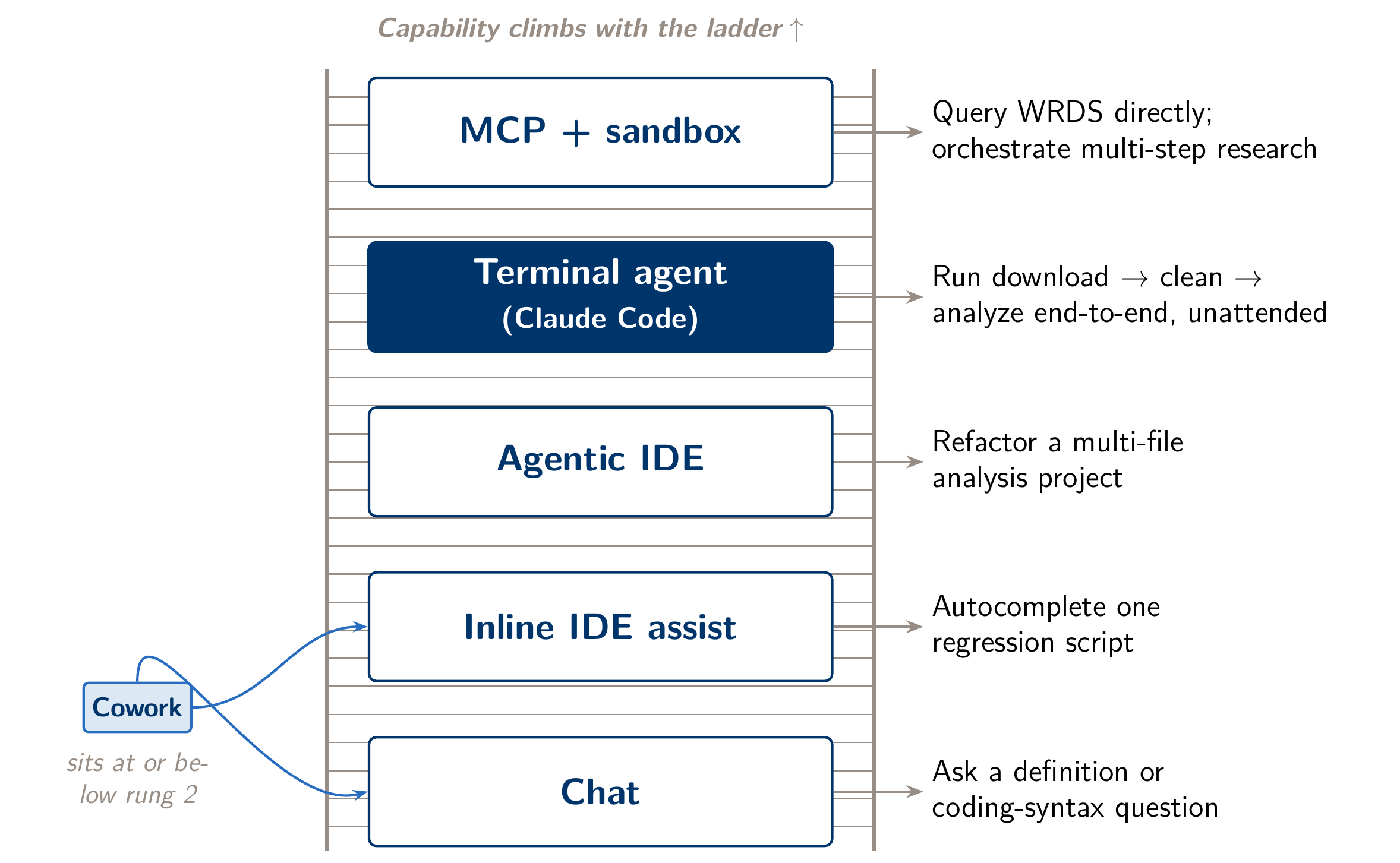
The four tools
Claude Desktop
What it is. Anthropic’s desktop app, with three tabs. Chat is a conversation app with Projects (persistent context you upload once and reuse across conversations) and connectors, which link it to external tools and data through MCP, the same protocol Module 4 uses for WRDS. In Chat, Claude works with what you paste or upload; it does not work directly in the folders on your machine. Code runs Claude Code itself, the same engine as the terminal version, with a graphical interface, a diff viewer and parallel sessions; everything this page says about Claude Code below applies to it. (Cowork, for longer agentic tasks, is not used in this course.)
When to reach for it. The Chat tab is for anything that is a conversation rather than a pipeline: a quick methods question, drafting an email, thinking through a referee comment before you touch the manuscript, or summarizing a PDF you’ve uploaded to a Project. It sits on the first or second rung of the ladder: useful for thinking work, and no help once a task requires working on files on disk. For that, switch to the Code tab, or to Claude Code in the terminal.
Cost / plan. A Claude Pro or Max subscription (Claude Max is a higher-usage tier for people running many long sessions), or pay-as-you-go API access if you’d rather not subscribe. Pricing tiers change, so check current rates before budgeting for a cohort.
Install pointer. Download it from Anthropic’s official site. It needs no terminal setup, which makes it the easiest starting point if you have never used an agentic tool.
Cursor
What it is. An agentic code editor. It is a fork of VS Code with inline AI edits, a chat panel that can propose and apply changes across several files, and an agent mode that plans a chain of edits and can run terminal commands as it goes. Paid plans add cloud agents that work in the background. On this course’s ladder it sits on the agentic-IDE rung: it is built around editing code you are looking at in the editor, while Claude Code is built around long runs across your whole project from the terminal.
When to reach for it. Mixed Stata/Python users who want a GUI rather than a terminal prompt, and who mostly edit code rather than run open-ended multi-step pipelines. Typical tasks are cleaning up a do-file, refactoring a script, or working through inline suggestions while you read the diff in the window you’re already working in.
Cost / plan. A paid Cursor subscription (Pro tier, roughly comparable in price to Claude Pro, with higher tiers for heavy use) is needed for meaningful agentic use beyond the free plan. Cursor can also be configured to call Anthropic’s models directly, which is useful to know if your institution already has an Anthropic API budget.
Install pointer. Download it from Cursor’s official site. Sign in, connect a model provider if you want something other than the bundled default, and open a project folder to get started.
Claude Code
What it is. A terminal-resident agent. It reads and writes files in your project directory, executes your existing R, Python, or Stata installation, and iterates (write, run, read the error, fix, rerun) without you retyping anything. This is the fourth rung, and the one this course is built on. Connected to an external service through the Model Context Protocol, it reaches the fifth rung: authenticated access to a licensed data source without your credentials ever entering the conversation. The WRDS MCP server Module 4 builds is the course’s example.
When to reach for it. Anything that is a real pipeline rather than a single edit: an empirical loop that goes from an empty folder to a verified figure (Module 2), an EDGAR scrape with a fallback chain of extraction patterns (Module 3), a WRDS pull with iron-law filters and a Parquet/DuckDB handoff to Stata (Module 4), or a capstone that has to pass a credential audit and a commit-history cross-check (Module 5).
Cost / plan. Same subscription as Claude Desktop (Pro or Max) or an API key. Claude Code is a separate install but draws on the same account. Max is meant for heavy agentic use: long sessions, large context, and frequent tool calls.
Install pointer. Install it with Anthropic’s native installer (one terminal command; see the Setup page), or use the Code tab in Claude Desktop. It does not need Node. It does need whatever R, Python or Stata installation your research already depends on, because Claude Code runs your code rather than shipping its own.
Codex
What it is. OpenAI’s coding agent, available as a CLI, an IDE extension, and a cloud-hosted execution environment. It occupies the same rung as Claude Code: it runs in the terminal or IDE, has file and execution access, and works in iterative agentic loops. A different lab builds it on a different model family.
When to reach for it. If your institution’s AI budget or existing subscriptions run through OpenAI rather than Anthropic, or if you want a second agent’s judgment on the same codebase. Some researchers run two agents against the same repo as a cheap adversarial check. The concepts this course teaches (context management, verification discipline, skills as SOPs, MCP-style tool access) transfer directly. The syntax and a handful of defaults differ.
Cost / plan. Included with paid ChatGPT plans (Plus and above, including Business and Enterprise), with more usage on the higher tiers, or billed through OpenAI API usage. There is no separate Codex subscription.
Install pointer. Install it following OpenAI’s official Codex documentation, either as a CLI package or an IDE extension, depending on which you want.
“I want to… → use…”
| I want to… | Use… | Why |
|---|---|---|
| Ask a quick lit question | Claude Desktop | There is no file to touch, so the lightest tool that answers the question is the right one. |
| Draft a referee response | Claude Code, editor-not-rewriter mode | The Module 5 editor-not-rewriter prompt needs the actual manuscript files and a skill such as barrios-voice or econ-humanizer running against them, not an excerpt pasted into a chat window. |
| Build a data pipeline (idea → figure) | Claude Code | This is the Module 2 empirical loop end to end (named scripts, a join, a paper trail), which requires real filesystem and execution access. |
| Scrape EDGAR filings | Claude Code | Rate limits, caching to disk, and a multi-pattern extraction fallback (Module 3) make this a multi-step, file-heavy job. A terminal agent can do it; a chat tool cannot. |
| Pull WRDS data | Claude Code + wrds-mcp |
This is what the fifth rung is for. Your WRDS credentials live in an environment file the MCP server reads, and they never enter the conversation (Module 4). |
| Revise a paper draft (writing + git) | Claude Code | Skills, strategic-revision, git commits as the unit of verification, and the no-hand-typed-numbers rule (Module 5) all assume the agent can see and version the actual repository. |
Where they overlap
Claude Code vs. Cursor’s agent mode. Both will plan and execute a multi-step change without you approving every line. The practical difference is where each runs and what it can reach. Cursor’s agent works inside the editor’s project view, which is comfortable if your work is mostly code files you’re already looking at. Claude Code works from the terminal against your whole project directory and whatever local runtime you have installed. That difference matters once a task spans data files, non-code artifacts, and long-running scripts rather than source files alone. A Stata-heavy researcher who likes watching inline diffs in a familiar editor may prefer Cursor for day-to-day edits and still use Claude Code for the heavier pipeline work.
Claude Code vs. Codex. These are close functional peers built by different labs. Both run in the terminal, read and write files, execute code, and iterate. Neither is clearly more capable at the kind of task this course teaches. The differences show up in model behavior on specific tasks, in how mature each ecosystem’s MCP servers and skill equivalents are, and in which subscription you already have. This course teaches Claude Code because its skills ecosystem and the wrds-mcp server the course depends on are built for it. The underlying concepts (context management, verification discipline, permission modes) are not Anthropic-specific, and they transfer to Codex directly.
Running multiple sessions in parallel
Once one agent feels routine, the next question is how to run two. The simple approach fails. Two Claude Code sessions in the same directory interfere with each other: they make conflicting edits, leave git in a dirty state, and one agent breaks a build while the other is mid-test. The clean solution is the git worktree. Each session gets its own directory tree, and every tree shares the same .git database, so branches stay in sync with no cloning and no syncing. This extends Module 5’s git-as-operating-system idea by one step: commits are the unit of verification, and worktrees are the unit of isolation.
cmux (“tmux for Claude Code,” MIT, pure bash) wraps that whole lifecycle into single commands. cmux new robustness-alt-winsor creates a worktree and branch and launches a fresh Claude session in it. cmux new fix-figure-labels starts a second, fully isolated session without touching the first. cmux merge and cmux rm fold finished work back into your main checkout and clean up. For a researcher, the pattern fits any task that forks: two variable-construction variants explored at the same time and compared before you commit to one; a referee-response robustness battery running in one worktree while you and another session revise prose in a second; or a risky pipeline refactor tried on a branch, where an agent can’t leak changes into your working copy.
Parallel sessions multiply usage the way parallel RAs multiply salaries. Subscription headroom that comfortably supports one session may throttle three. Parallel sessions also multiply verification debt at the same rate they multiply output. Every worktree still owes the Module 5 discipline (paper trail, inspection, one number checked by hand) before its branch merges, not after. cmux merge combines branches in git; it does not check the work.
Other options, briefly. manaflow-ai/cmux (same name, different tool) is a Ghostty-based macOS terminal with vertical tabs and notifications, built for watching several coding agents at once. It handles the display problem, while craigsc/cmux handles the workflow. Dashboard tools such as amux monitor many sessions from one place. Start with worktrees, because they teach the concept. The other tools add convenience on top.
Last reviewed: October 2026. Tool capabilities, pricing, and install steps change often. Treat the profiles above as a starting point, and check each vendor’s current documentation before you commit a cohort to one.