Module 5: Writing, Safety, and the Verification Capstone

Watch: Module 5 walkthrough (20 min, narrated slides)
Every module in this course has ended with an artifact, such as a script, a figure, a SKILL.md or a Stata extract, that Claude Code helped you build faster than you would have built it alone. This module is about two things that decide whether that speed was worth having. The first is whether the words around those artifacts are actually yours. The second is whether a coauthor, a referee or you a year from now could pick up the repo and trust it without redoing the work. The morning is about the writer: where delegating to an agent sharpens your thinking, and where it replaces it without your noticing. The afternoon is about the record: the sandboxes, credential habits, paper trails and git discipline that make a fast pipeline one you can defend. The capstone lab asks you to take a pipeline you built earlier in this course and make it hold up under both kinds of scrutiny at once.
Writing as thinking, and the loop that undoes it
Start from a claim worth taking seriously: writing is not just how you report your thinking. Much of the thinking happens while you write. If you can’t get a sentence to work, you usually haven’t worked out the argument behind it yet, and the discomfort of drafting is often part of the work. Handing that discomfort to an LLM saves more than typing time. It can also hand off the reasoning that the typing was forcing you to do.
This failure is hard to notice while it is happening. You give the model a vague prompt, such as “help me explain why this identification strategy is credible.” It produces something fluent and plausible, and you read it, agree, and paste it into the draft. Nothing about that step feels like a mistake, because the paragraph reads fine. The problem is that the work of deciding why the strategy is credible happened inside the model, not in your head. You now have a paragraph you agree with but did not think through. You find out when a discussant, a referee or you six months later asks you to defend the claim, and you can gesture at it but not argue it.
The test is whether you can discuss the paragraph out loud, without the document or the model in front of you. If you can walk a colleague through the argument in your own words and answer a follow-up question, you did the thinking and the model helped you say it. If you can’t, better prose will not fix it. Go back and work through the claim before you write another sentence about it. A related point: rushed or exhausted writing handed to an LLM tends to come back generic, because a vague, tired prompt gets you the model’s default. If you’re too tired to say what you actually think, stop for the day rather than delegate.
The banal/meaningful line
The rest of the morning is about one distinction. Some writing in a paper is banal and some is meaningful. This module’s writing practice comes down to telling them apart and treating each one differently.
Banal writing is writing whose content is already set by something else: the data, the specification, a table you already ran. Variable-definition tables, data appendices, the standard paragraph on how a control was constructed, table notes and robustness-panel headers all fall here. None of them requires an original thought, because the thing they describe already exists and the writing only makes it readable. An agent is a clear improvement for this kind of writing. It is faster, no less accurate than you would be by hand, and it does not get bored, which is when careless errors creep in the tenth time you write the same kind of sentence.
Meaningful writing is different. The identification argument, the statement of your contribution, and the limitations section that says plainly what your evidence can and cannot support are not transcriptions of something that already exists. They are the argument. If you delegate them, you risk more than a worse sentence. You risk a paper whose central claims you never reasoned through, which is the cognitive-offloading failure from the previous section applied to a whole paper instead of one paragraph.
There is no fixed list. You decide where the line falls, and the skill is drawing it explicitly instead of leaving it implicit and letting it drift. Before you go on, write down one personal delegation rule: one category of writing in your current project that you will always hand to an agent, and one you will never let an agent start, only react to.
Anti-homogenization: keeping your own voice
There is a second reason to protect the meaningful side of the line, and it has nothing to do with correctness: voice. On current evidence, LLMs reliably turn weak writing into serviceable writing, but they pull writing that already had a distinctive voice toward the same competent, slightly generic register. If everyone drafting in accounting and finance uses the same tool for the same kind of sentence, the field’s prose will tend to sound more alike, not less.
This is partly a problem for the field and partly a personal one. Accounting journals already have real house styles, which helps a little: a JAR paper and a TAR paper do not read the same today, and those genre conventions keep every paper in every journal from sounding identical. They do not remove the risk within a journal’s own house style, where papers can still drift toward an LLM’s default voice for that register. The skills shown in the video, a personal style guide and a detector for AI-typical phrasing, exist to push back against that drift.
Editor, not rewriter
The most useful habit for keeping an LLM on the right side of the line is a specific instruction: ask for comments, not rewrites. If you ask a model to fix your prose, you get back sentences you must either accept or reject. Accepting is offloading that looks like editing. Rejecting requires already knowing what’s wrong, in which case you didn’t need to ask. Ask instead for inline comments at the places where the argument is weak, with an explicit instruction not to touch the prose. The model then spends its fluency on diagnosis instead of replacement, and you do the rewriting and the thinking yourself.
Here is the exact prompt. The video runs it on an identification paragraph:
Please review this Identification section. I want feedback in the style of
a New York Times editor — sharp on argument and clarity. Do not directly
edit my writing. Instead, insert inline <!-- comments --> at the specific
places where the argument is weak, unclear, or could be tightened. Do not
rewrite any sentences yourself; leave the prose exactly as written and let
the comments carry the feedback.
Without “do not,” you get a rewrite back. A capable model asked to edit will hand you a polished rewrite, and a polished rewrite invites you to stop thinking and start accepting. With “do not,” the model still tells you where the argument is weak, but the sentence-level decisions stay yours. That is the only way those sentences can pass the “can you discuss it without the LLM” test later.
The clean-room referee
The editor prompt above has a weakness that is easy to miss: it usually runs in the same session where you wrote the section. By then the model has heard every justification you gave along the way. You told it why the sample starts in 2004, why financials are dropped, why the placebo test doesn’t matter. A real referee has heard none of that, which is why a real referee catches what you can no longer see. A model that has watched you argue yourself into a design will tend to accept the design.
The fix is to give the critique its own clean room. Run it in a fresh session, or in a sub-agent (Module 4), whose only input is the draft itself: no chat history, no DECISIONS.md, no notes on what you meant. Make it read-only, so it can’t “help” by editing the paper. And have it write its report to a file, such as review/referee_identification.md, so the critique survives the session and you can respond to it point by point, the way you would a real report.
A fresh session started inside your project is not clean on its own. It loads the project’s CLAUDE.md, and it can open DECISIONS.md, LOG.md and your code whenever it likes. A sub-agent also loads CLAUDE.md by default, and it works from a task message the main session writes, which can carry your justifications along. “Do not edit any file” in a prompt is also a request, the kind the table later in this module calls asks. So build the clean room out of folders and a deny rule:
mkdir -p ~/referee_room/paper ~/referee_room/.claude
cp paper/*.tex ~/referee_room/paper/
echo '{"permissions":{"deny":["Edit(./paper/**)"]}}' > ~/referee_room/.claude/settings.json
cd ~/referee_room && claude
The session now has nothing to read but the manuscript, and the deny rule, not the prompt, keeps it from editing the paper while it writes its report to review/. Your personal ~/.claude/CLAUDE.md still loads, so keep project details out of that file.
You are refereeing this paper for the Journal of Accounting Research. You
have only the manuscript in paper/. Do not edit any file. Read the
identification section and the sample-construction section, then write a
report to review/referee_identification.md. For every sample filter the
paper states, check whether the attrition it implies is consistent with
the N reported in Table 1, and list any filter whose effect on the sample
is never reported. Aim the criticism at the paper, not the authors.
Accounting papers often describe one sample and build another: a filter described in the text that never appears in the attrition table, or a Table 1 N that the stated filters can’t produce. A reviewer who never saw your cleaning script has to reconstruct the sample from the prose alone, which is the same test your prose has to pass at the journal.
The last line of that prompt matters too. Comments aimed at the authors do not make a report tougher. They give you nothing to fix. Keep the reviewer pointed at claims, evidence and gaps.
This pattern borrows from two public prompt designs worth reading: Scott Cunningham’s Referee 2 persona, which audits a paper as an adversarial second referee, and the “Editor” persona in Alessandro Spina’s Claude Code presentation materials, which files its reports to disk and never touches the author’s files.
Style guides as living documents
A personal style guide is a skill that has read a stack of your own published prose and records what it found. As in Module 3, it works as a written procedure, not a new ability. You build it the way you build any skill. Collect samples you’re proud of, point Claude at the folder, and ask it to describe your sentence length, your hedging habits, how you open a results section and what you never do. Then let it draft a SKILL.md from that analysis. It gets its own demo in the video because of what it gets wrong as well as what it gets right.
barrios-voice is built this way, from a corpus of John Barrios’s own JAR and TAR papers. It records real, specific patterns: sentence-length habits, a preference for stating a coefficient as a dollar amount rather than leaving it as a coefficient, and little tolerance for stacked hedges. Run on a paragraph in the video, it gets a lot right immediately. It also produces passages that read like a caricature: the voice pushed slightly too hard, recognizable but exaggerated, the way a good impressionist is still not quite the person. You can’t engineer that away. Any style guide is a snapshot of how you wrote when it was built, compressed into a markdown file, so it has to be curated and re-run periodically rather than built once and trusted indefinitely.
econ-humanizer solves a related but different problem. It asks whether the text sounds like a language model, not whether it sounds like you. Run on an obviously AI-generated paragraph, it flags the familiar tells: inflated claims of importance (“pivotal,” “groundbreaking,” “underscores”), stacked hedges, the formulaic “this paper contributes to the growing literature on X by Y” sentence, em-dash overuse, the three-part list, and vague attributions like “researchers have shown.” The output is not necessarily your voice; that is barrios-voice’s job. But it reliably removes the parts of a paragraph that read as machine-generated, whoever’s voice sits underneath. Used together, the two skills cover both halves of the homogenization problem. One keeps your voice from flattening into the model’s default. The other removes the model’s fingerprints, so what remains is at least a voice rather than the one every LLM defaults to. (latex-tables, mentioned only in passing, handles the banal side: formatted regression tables, notes and headers. That frees time for the meaningful writing the other two protect.) econ-humanizer and latex-tables are in the course’s skills catalog. barrios-voice is not, because it is built from one person’s papers; build your own style guide the way this section describes.
Referee-DAG: planning a revision
Revise-and-resubmit decisions are central to accounting publishing. Four referee reports with overlapping and sometimes contradictory requests make a hard planning problem before you’ve written a single revised sentence. The strategic-revision skill treats a stack of referee reports the way a project manager treats a stack of tickets. It splits every distinct comment into a task and works out which tasks depend on others (you can’t rewrite the conclusion before running the robustness check it depends on). It then groups the tasks into blocks that can run in parallel, and it flags the critical path and any places where two referees ask for contradictory things.
Take the habit from the demo, not the machinery underneath it. Which Python library validates the dependency graph is an implementation detail. The habit that carries over is to break the revision into discrete tasks, map the dependencies explicitly, batch what can run in parallel, and find the critical path and the conflicts before you start writing. It applies to any messy revision with several reviewers, whether or not it involves a paper. strategic-revision is not in the course catalog, so on your own you run these steps by hand or with a plain prompt that asks for the same four outputs.
Auditing the response letter
The DAG plans a revision. It doesn’t tell you whether the revision you describe actually happened. The response letter says it did, and the letter is both the highest-stakes document in an R&R and an easy place for an LLM to make things up. A model drafting a response will write “We now report results using an alternative leverage definition in Table A2” with complete confidence, whether or not anyone ran the check. That is the same kind of sentence as the fabricated DECISIONS.md entry later in this module, only now it is addressed to an editor.
So audit the letter before it goes out, the same way you audit a paper trail. For every claim the letter makes, build a three-column check:
| Claim in the letter | Where it appears in the revised manuscript | Commit whose diff implements it |
|---|---|---|
| “We add firm fixed effects to Table 4” | Table 4, columns 3–4; text in §5.2 | a41c9e2: adds firm_fe to the Table 4 script |
| “We now cluster at the industry level” | Table 4 notes | (none found) |
Any row with an empty cell is a problem. An empty middle column means the letter promises a change the reader can’t find. An empty right column means the manuscript says something no script produces. The second kind is more dangerous: the text was edited to match the promise, but the numbers never changed.
Claude is good at the first two columns, because it can read both documents and match them up. Ask it to fill in the third column from git log and the diffs, and to leave a cell empty rather than guess. Then check every empty cell yourself, and spot-check two or three filled ones. As with the paper trail, the table tells you where to look. It does not prove the changes were made.
The idea of mapping each referee concern to the response, the manuscript location and whether that location was verified comes from the R&R mode of the “Editor” persona in Spina’s materials, linked above. The commit column is this course’s addition. It turns a consistency check between two documents into a check against what was actually run.
Verification debt: the module’s second framework
Now turn from the writer to the record. Every task in this course has had two costs: the cost of making the thing and the cost of verifying that it’s correct. Before agentic tools, those costs often moved together. Something expensive to make, like a hand-built panel or a hand-coded measure, had usually been checked along the way, because it was built slowly. Agentic coding breaks that link. A regression table, a keyword-based text measure or an EDGAR extraction pipeline can now be made in minutes, while the cost of checking whether it’s right has fallen far less. The gap between those two costs is verification debt: a growing pile of AI-produced output you have not actually checked.
Plot each research task on two axes, cost to make (x) and cost to verify (y), and the quadrants show where the field is most exposed. The top-right quadrant, labeled “high stakes, both ways” in the figure, is the safer one: expensive to make and expensive to verify, where slow production forced checking along the way. The danger zone is top-left: cheap to make, costly to verify. A keyword count over a decade of 10-K Risk Factor sections is a clean example. Claude builds it in ten minutes. Showing that the count measures disclosure change rather than boilerplate copied forward takes an hour of hand-coding a stratified sample and computing something like year-over-year Jaccard similarity. An AI-drafted regression table is a second example: fast to produce, slow to verify against the filter logic and sample construction behind it.
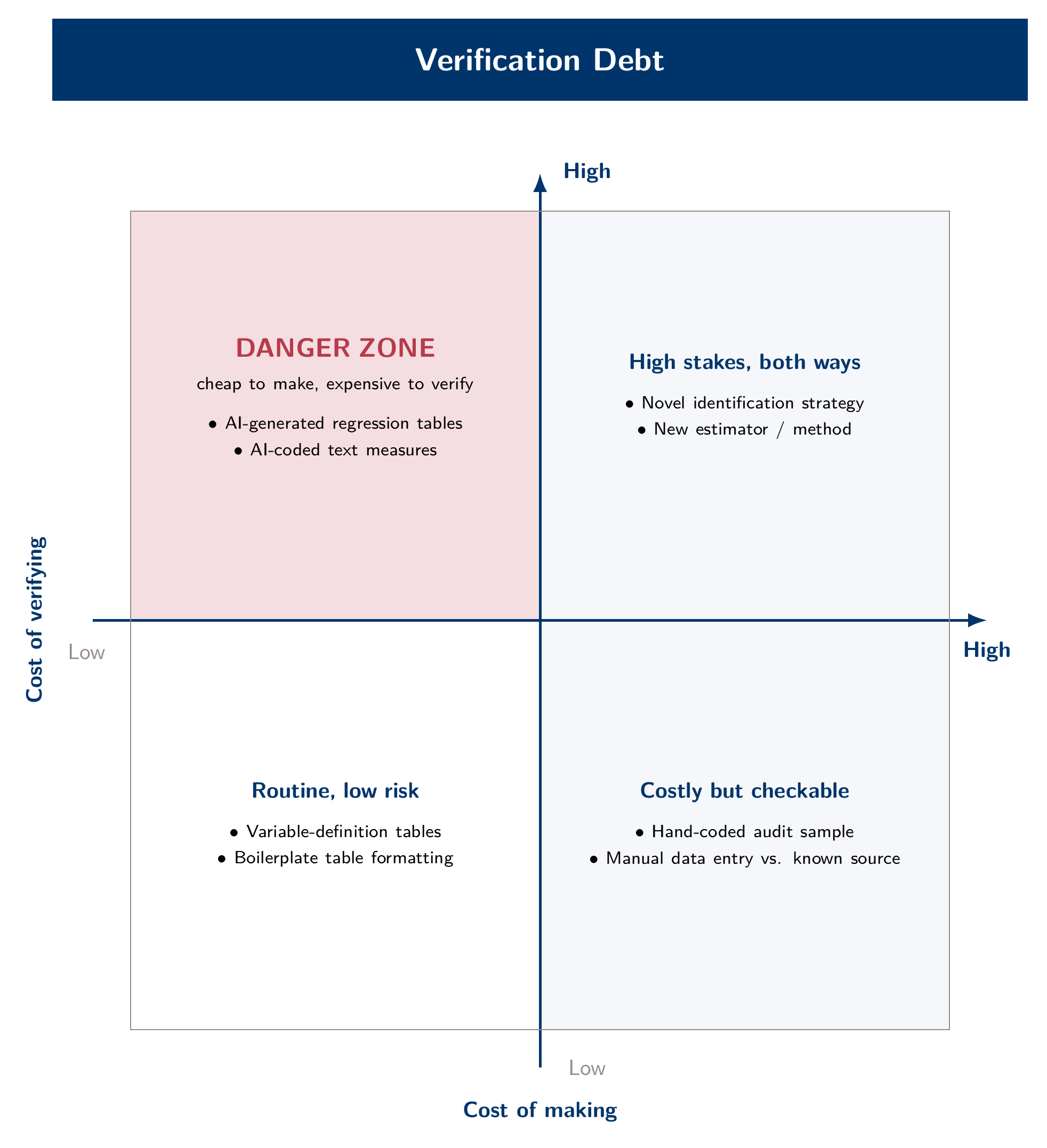
The figure gives the idea, but sorting your own tasks into it is what makes it stick. Take two tasks from your Module 2 through Module 4 labs and place each on the grid in three minutes, with a partner if you have one. Most people find at least one task in or near the danger zone. Naming it out loud is the purpose of the exercise, because unverified work is easier to notice once you’ve had to place a dot for it.
Autonomy is what makes this urgent. The more freedom you give an agent to work unsupervised, through longer unattended runs and fewer check-ins, the faster verification debt builds up. The checking that would have been spread across many small checkpoints arrives all at once, as a finished-looking repo, figure and headline estimate. Approving each step manually does not solve this by itself, because approving a step you don’t understand verifies nothing. What matters is how much you understand and check as the work happens, not how many times you clicked “yes.”
Environment first: sandboxes and the autonomy ladder
Before any procedural fix, get the environment right. The environment decides whether an overconfident agent is a minor annoyance or a real problem. Ask what this agent can see, and what the worst thing is that it could do with what it can see. If you run Claude Code from your home directory with permission checks fully disabled (--dangerously-skip-permissions, often called “YOLO mode”), your SSH keys, every credential on the machine and every other project you’ve cloned are within reach, however well-behaved the model usually is. The exposure comes from the environment, not the model’s judgment.
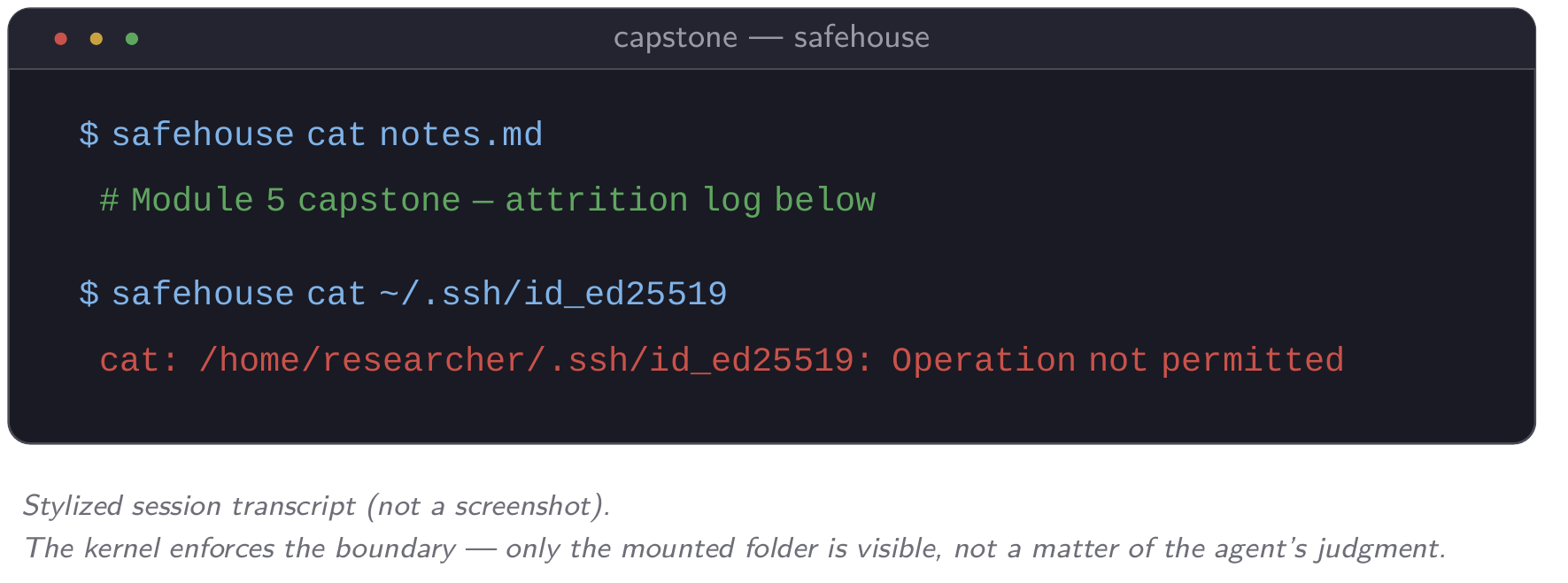
A Docker dev container and agent-safehouse (a lighter, kernel-enforced sandbox for Mac) give an agent its own view of the filesystem. Only the folders you explicitly mount are visible, and the agent cannot widen that view itself, because mounting is decided on the host. That is why skipping permissions inside a container is a different kind of risk from skipping them on your own machine. The video shows this, and the starter pack’s container quick-start lets you reproduce it. Inside a safehouse session, cat ~/.ssh/id_ed25519 returns Operation not permitted. The agent did not choose to decline. The kernel will not let the process see the file at all.
Claude Code also has a sandbox of its own. Run /sandbox in a session to turn it on. It uses the same macOS mechanism as safehouse, and bubblewrap on Linux and WSL2, so it is the simplest option on Linux. It covers shell commands and the programs they start, not Claude’s built-in file tools, which follow your permission rules instead. By default it still lets commands read most of your machine, including ~/.ssh, so add the paths you want hidden to its denyRead setting. The sandboxing guide has the details.
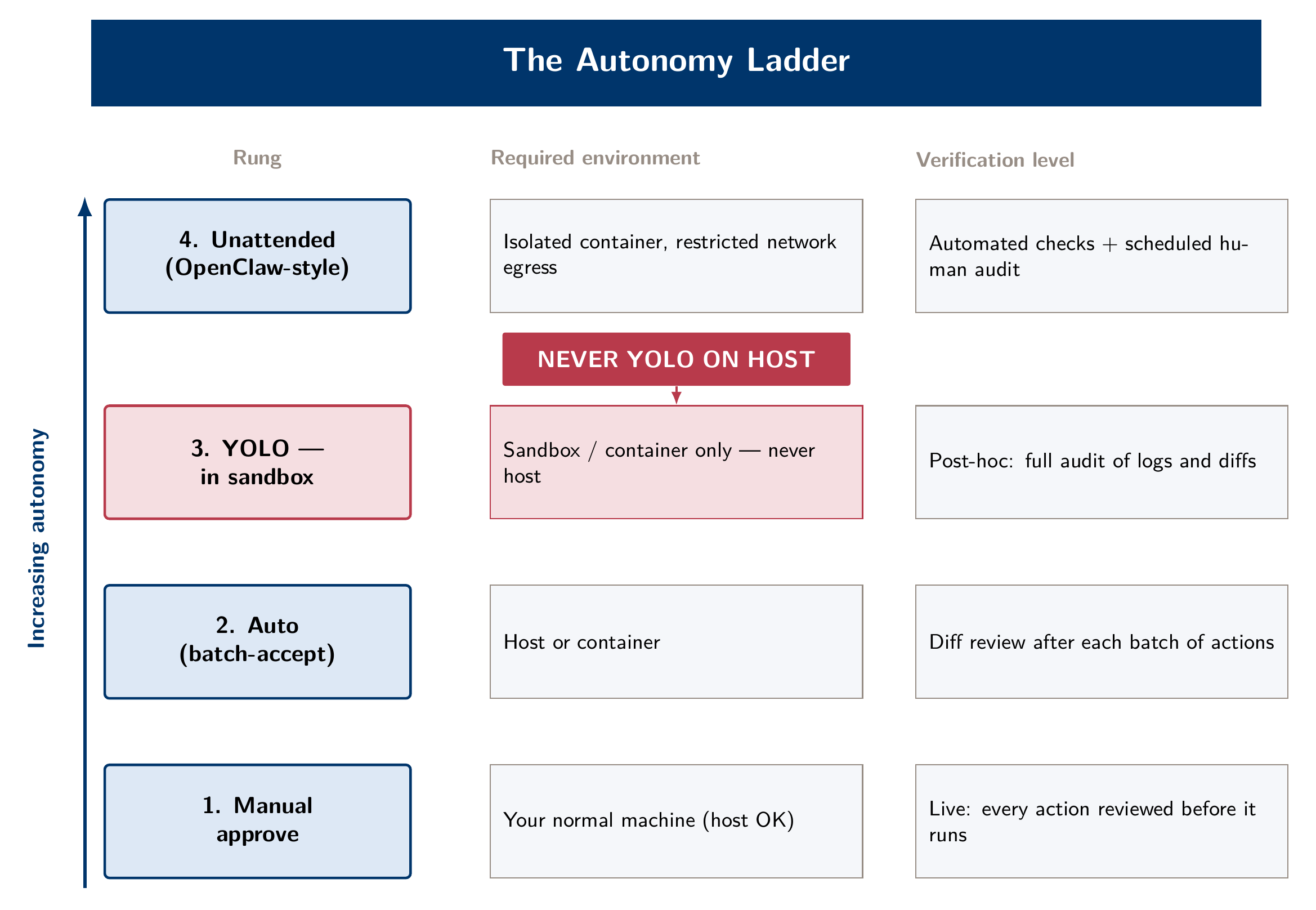
Read the ladder as two settings that interact, autonomy and environment, not as a ranking from worse to better. Manual approval is the right default in an unfamiliar or unsandboxed project. Auto mode, where routine actions proceed and a classifier blocks risky ones and tells Claude why, is the right default for the iterative, exploratory work most of this course involves, as long as git is handling rollback as described below. YOLO is appropriate only once the environment limits the worst case on its own: inside a container, with internet access cut off if the task doesn’t need it, and with nothing mounted beyond the one project folder. The top rung, an agent running unattended for long stretches against a persistent mount, is where the stakes and the container boundary matter most, because nobody is watching in real time.
One more permission decision belongs here. Installing a third-party skill puts someone else’s instructions into your environment, and it deserves the same scrutiny as installing any other software. A skill published by Anthropic or built by your own group is one thing. A two-star repo from a forum post is another. Read a skill before installing it, the way you’d want a colleague to read a script before running it on your data. A markdown file can still instruct an agent to do something you would not have approved.
Permission rules: writing the boundary down
Between trusting the model and running it in a container sits a cheap middle layer that is easy to skip: permission rules. A short settings.json file tells Claude Code which actions to allow, which to always ask about and which to refuse. It applies in every permission mode, so a deny rule holds even when you’ve skipped permission checks entirely. Put it in .claude/settings.json inside the project and commit it, so every coauthor who opens the repository works under the same rules. (.claude/settings.local.json holds personal rules that stay off git; ~/.claude/settings.json applies to every project on your machine.)
{
  "permissions": {
    "deny": [
      "Read(./.env)",
      "Read(./.env.*)",
      "Read(~/.ssh/**)",
      "Read(~/.wrds-mcp.env)",
      "Read(~/.claude.json)",
      "Edit(./data/raw/**)",
      "Bash(rm -rf *)"
    ],
    "ask": [
      "Bash(git push *)"
    ]
  }
}
Read it line by line. Claude’s file tools can’t open your .env, your SSH keys, the private WRDS credential file from Module 4, or ~/.claude.json, where claude mcp add saved your WRDS password when you registered the server. They can’t edit the raw data folder either, which is where your downloaded EDGAR filings or the original FSDS extract belong; every cleaning step writes somewhere else. A literal rm -rf is refused outright, and pushing to GitHub always stops for a human, whatever mode you’re in. Deny rules are checked first, so no allow rule elsewhere can make an exception to them.
Know the limits, which are the same ones the container section raised. These rules match Claude’s built-in tools and the literal text of a shell command. Bash(rm -rf *) stops rm -rf data/ but not rm -fr data/, /bin/rm -rf data/ or the same command wrapped in bash -c, and a Python script can still write into data/raw/. A Read deny on .env also stops shell commands that name the file, such as cat .env, but grep -r PASSWORD . or a Python script that opens .env reaches the same file another way. Permission rules take two minutes to write and are worth having, but they are not a sandbox. Only the operating system enforces a boundary that holds however the command is phrased.
Requests versus enforcement
By this point in the course you’ve met most of the ways to shape what Claude Code does. They fall into two kinds, and confusing the two leads to false confidence:
| Mechanism | Where it lives | What it does | Kind |
|---|---|---|---|
| CLAUDE.md | project root | standing context, loaded every session | asks |
| Path-scoped rule | .claude/rules/*.md with a paths: line |
instructions that load only when Claude touches matching files | asks |
| Skill | .claude/skills/<name>/SKILL.md |
a procedure, loaded when relevant or run as /name |
asks |
| Sub-agent | .claude/agents/<name>.md |
a separate context for a delegated job (Module 4) | asks |
| Permission rule | settings.json, permissions |
allows, asks about, or refuses matching tool calls | enforces |
| Hook | settings.json, hooks |
your own script, run at fixed points; can block an action | enforces |
| Built-in sandbox | /sandbox, or sandbox in settings.json |
an operating-system boundary around shell commands | enforces |
| Container or sandbox | outside Claude Code | an operating-system boundary | enforces |
Everything in the top half is a request. The model reads it and usually complies, but “usually” is a probability, not a guarantee, and a long session, a compacted context or a confusing instruction can all lower it. Everything in the bottom half runs whether the model agrees or not. So anything that must happen every time, with no exceptions, belongs in the bottom half. “Never modify raw data” in CLAUDE.md is a request the model usually follows. Edit(./data/raw/**) in the deny list is enforced.
A hook is the most flexible enforcer, because it’s just a script. This one runs the password search from the next section automatically. It refuses any commit Claude tries to make if the commit would include your WRDS password:
#!/bin/bash
# .claude/hooks/no-secrets.sh  (make it executable: chmod +x .claude/hooks/no-secrets.sh)
# Blocks any git commit Claude runs if the commit would include your WRDS password.
INPUT=$(cat)                                    # the proposed command, as JSON
echo "$INPUT" | grep -q "git commit" || exit 0
[ -n "$WRDS_PASSWORD" ] || . ~/.wrds-mcp.env 2>/dev/null
[ -n "$WRDS_PASSWORD" ] || exit 0               # no password to look for
if { { git diff --cached; git diff; } | grep '^+'
     git ls-files -o --exclude-standard -z | xargs -0 cat
   } 2>/dev/null | grep -qF -- "$WRDS_PASSWORD"; then
  echo "Blocked: this commit would include your WRDS password" >&2
  exit 2
fi
exit 0
It searches for the password itself, not the name WRDS_PASSWORD, so a script that reads the password from the environment, the right way to do it, passes. It checks every change since the last commit plus new files, not only what is already staged, because Claude often stages and commits in one command (git add -A && git commit), and the hook runs before that command starts.
Register it in .claude/settings.json so it runs before every shell command Claude issues:
{
  "hooks": {
    "PreToolUse": [
      {
        "matcher": "Bash",
        "hooks": [
          { "type": "command", "command": "\"$CLAUDE_PROJECT_DIR\"/.claude/hooks/no-secrets.sh" }
        ]
      }
    ]
  }
}
Claude Code passes each proposed command to the script as JSON. Exit code 2 blocks the command and shows Claude the message, and exit 0 lets the normal permission flow continue. Any other exit code, including the error you get when you forget chmod +x, counts as a non-blocking error, and the commit goes ahead. Test the hook once with a fake password before you rely on it. One caveat: this hook only checks commits Claude makes. Commits you type in your own terminal never pass through it, which is why you still need the after-the-fact audit below. The hooks guide and the permissions reference have the full syntax. Check them against your installed version, because both features still change from release to release.
Credential hygiene: the two-check audit
Everything above sets up the environment before anything goes wrong. Credential hygiene is the matching check afterward: a fast, mechanical way to confirm that nothing sensitive slipped through despite your intentions. Run these two checks from the root of any project before you consider it clean. The first asks whether a credential file was ever committed:
git log --all --full-history --oneline -- '*.env' '*.env.*' '.mcp.json'This should return nothing. It looks for a .env file, or a variant such as .env.local, in any folder and at any point in the history, plus a project-level .mcp.json, which holds credentials if you ever registered an MCP server with project scope. If it returns even one commit, a credential file was committed at some point. Deleting the file now does not remove it from history, and anyone who clones the repo can still find it in an old commit.
The second asks whether your actual password appears anywhere, in any commit or in any file you have not committed yet:
source ~/.wrds-mcp.env
: "${WRDS_PASSWORD:?source your env file first}"
git log --all --oneline -S"$WRDS_PASSWORD"
git grep -l -F --untracked -e "$WRDS_PASSWORD"
The first line loads your password from the private file Module 4 set up, outside the project. The second stops with an error if the password didn’t load, so an empty search can’t pass by accident. The third lists every commit that ever added or removed the password, including in a script you have since deleted. The fourth lists files git would pick up that contain it now, skipping files your .gitignore excludes. Both print commit IDs or file names, never the password. All of this should return nothing. The search is for the password itself, not the name WRDS_PASSWORD, so a script that reads the password from the environment, as it should, passes, and a script with the password typed into it fails.
Repeat the second check for every other secret the project uses, such as an API key. Type read -s SECRET, paste the key (it won’t echo), and run the last two lines with $SECRET in place of $WRDS_PASSWORD. On the public-data track there is no WRDS password; run the first check, and the second only for any API keys you used.
Paper trails: check the documentation against the commits
Ask for the audit trail before the work happens, in the same prompt that describes the task. Request three things up front. The first is a DECISIONS.md that records every methodological choice, the alternatives considered and rejected, and a rough confidence level. The second is a LOG.md that narrates the session in plain language a coauthor could follow without reading code. The third is a sample-attrition table printed at every stage of any cleaning or filtering step, showing the N, what dropped and why.
Then check them, because an LLM will write a DECISIONS.md entry saying a piece of work was done when it was not. Models do write entries like this. The example below is staged so you can see one clearly, and it is worth walking through, because the entry looks trustworthy until you check it.
Picture a funda-style Compustat pipeline, a leverage-and-controls panel like the one built in Module 4’s lab or its public-data fallback. The session’s DECISIONS.md includes an entry that reads, in effect: “Added an alternative leverage definition (total liabilities / total assets) as a robustness check; results are consistent with the main specification (see Table A2).” The entry is confident and specific, and it reads like something a careful RA would write after running the check. But no Table A2 script exists anywhere in the repository, no commit added an alternative leverage variable, and git log shows no matching work at any point in the session. The documentation describes a robustness check that was never run. Anyone who read it and moved on, instead of checking it against the commit history, would carry a false robustness claim into a paper.
Treat every specific claim in a DECISIONS.md or LOG.md as something to check against the commit history, not a fact to file away. Pick one claim, find the commit it should correspond to, and confirm the diff does what the prose says. If no commit matches, the claim is unverified, however confidently it’s written. Documentation tells you where to look. It does not prove the work was done.
For an example of this discipline formalized for an actual journal submission, with replication code, execution logs and sample identifiers packaged to meet JAR’s data-sharing policy, see Eric Weisbrod’s example-project template, listed on the Resources page.
No hand-typed numbers
A narrower rule follows from the same concern. It predates AI, though AI makes it more important: nobody should type a number into the manuscript by hand. A pipeline script computes a result, such as a coefficient, a standard error or a sample size, and writes it to a results.tex file as a LaTeX macro or table fragment. The paper’s .tex source never states that number directly. It pulls it in with \input{results/table2_main.tex}. When the sample changes or a filter is corrected, rerunning the pipeline regenerates results.tex, and the paper updates at the next compile. Nobody copies a number from a terminal into a draft, so there is no step where a plausible but wrong number can slip into the manuscript unnoticed.
This discipline was not invented for AI-assisted work; copying numbers by hand has always produced errors that nobody notices. What changes with an LLM in the loop is the failure it guards against. A model asked to draft a results paragraph will, without a hard constraint, write a fluent sentence containing a number that sounds right but was never computed by anything. The \input{} pattern makes that failure easy to catch: any number in the results text that isn’t a macro is one nothing computed, so you don’t have to rely on spotting a wrong value in proofreading.
Git as the operating system
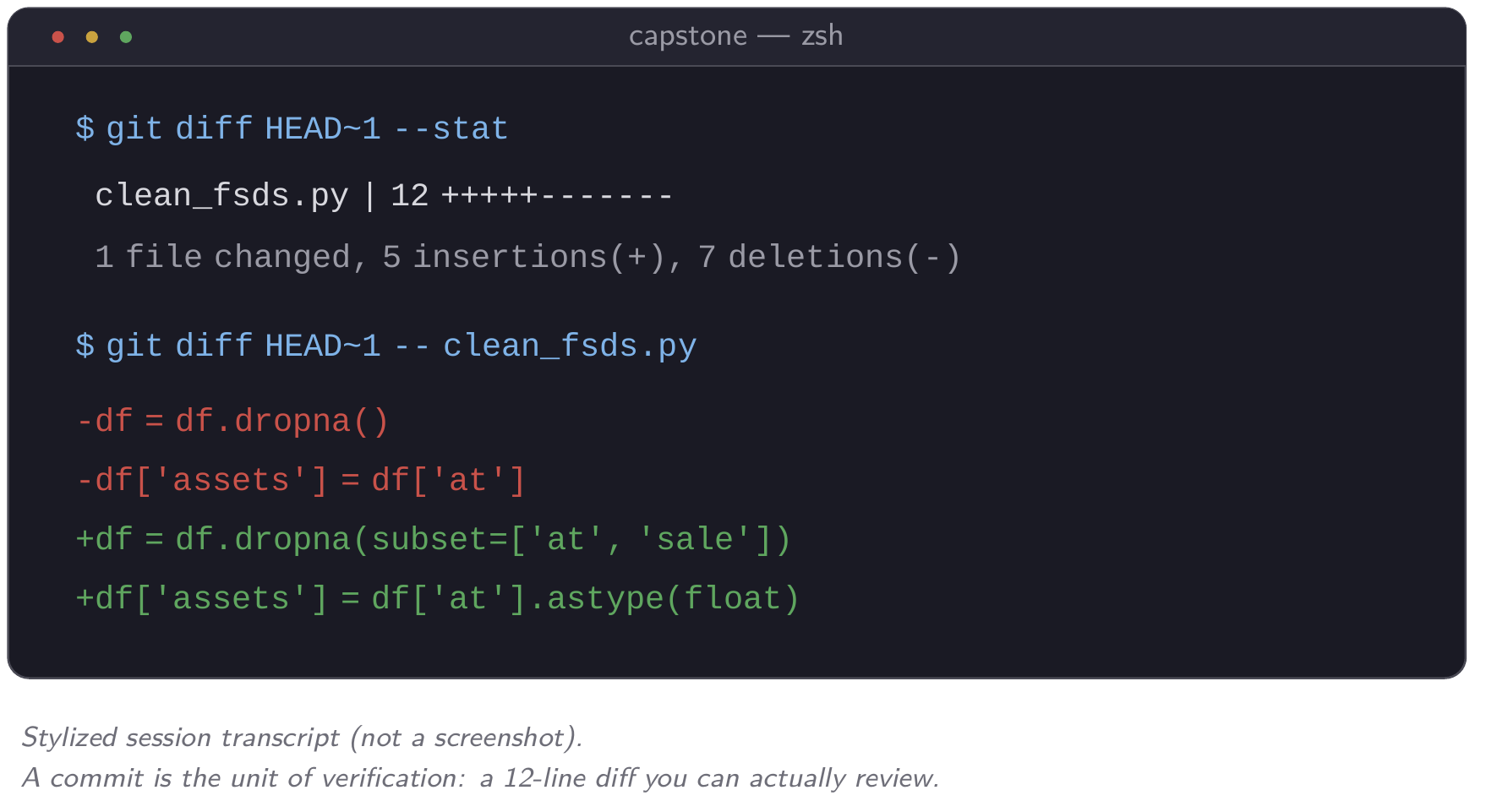
Everything above, from commits as checkpoints to diffs as the unit of review to rollback as the safety net that makes Auto mode reasonable rather than reckless, relies on git, which you’ve been told to wait for since Module 1. This module keeps the lecture short and focuses on habit, because the content is five commands and one rule, not a semester of version-control theory. The one-page git handout in the starter pack (git_handout.md) has the five commands, a .gitignore starter and the rollback recipe. The video shows a git diff HEAD~1 after a real Claude Code session, followed by one rollback.
The idea to carry forward is that a commit is the unit of verification. Nobody reviews an 800-line pipeline well all at once. A 12-line diff from one commit, with a message that says why the change was made, is something you can review every time without it becoming a chore you skip. At the start of every project, tell Claude to commit at every meaningful checkpoint. The request costs one sentence in your opening prompt, and it turns one large unreviewable change into a sequence of small ones you can check. Together with the credential audit and the paper trail above, this is what makes an agent-assisted project auditable. Things will still go wrong, but when they do, you know where to look.
One pointer beyond this module, for when a single session is not enough: git has a second feature, the worktree, that gives each of several parallel Claude sessions its own directory while all of them share one repository. You might explore two robustness variants side by side, or rebuild a pipeline in one session while a second revises prose. cmux wraps the whole pattern into single commands, and the Tools page covers it in full. It also covers the main caveat: parallel sessions multiply verification debt as fast as they multiply output, and every worktree needs this module’s checks before it merges.
What to set up after this course
The autonomy ladder above is one dial. How much you configure is a second one, and it is easy to overbuild. A sensible order:
- Every project, from day one: a CLAUDE.md with your data sources, conventions and verification rules, plus a progress log, and git.
- When a correction repeats: the third time you give Claude the same instruction, turn it into a skill. Add permission rules as soon as a project holds credentials or licensed data.
- When a pattern repeats across projects: sub-agents for jobs you delegate often, hooks for checks that must run every time, and skills installed globally rather than per project.
Build each piece when a real repetition or a real risk calls for it, not in advance. A setup you designed before you knew your own workflow is one you will spend time maintaining instead of using. This progression echoes the three-tier adoption structure in Alessandro Spina’s Claude Code brownbag, listed on the Resources page.
Into the capstone
The rest of this module puts all of this together. The capstone lab asks you to take a pipeline from Module 3 or Module 4 and harden it against the rubric this module just covered: reproducibility, verification, hygiene and, as a stretch, a container rerun with output showing the blocked access. Before you start the lab, take thirty seconds to write down your answer to two questions: one task you will always delegate without a second thought, and one you will never let an agent start, only react to. The lab’s exit ticket asks for both again. Module 6 returns to a harder version of the same question, applied not to one paper but to what a PhD is for.